 Goods Receipt Posting from External Procurement
If you order products from an external reference source, for example from a supplier, you must execute the good receipt posting from external procurement. The goods receipt process from external procurement can have a different process flow depending on, for example, whether or not there is an advanced shipping notification (ASN).
Prerequisites
If you are working without ASNs but with the expected goods receipt function, you have carried out the following prerequisites:
You have allowed manual creation of single delivery items in Customizing for
Extended Warehouse Management
under
Goods Receipt Process

Inbound Delivery
Manual Settings
Define Item Types for the Inbound Delivery Process
 .
You have defined the document type determination and item type determination for the inbound delivery that EWM is to create, in Customizing for
Extended Warehouse Management
under Goods Receipt Process
Inbound Delivery
, in the following Customizing activities:Define Document Type Determination for Inbound Delivery Process
Define Item Type Determination for Inbound Delivery Process
You have defined the required profiles for the document type and item type in Customizing for
Extended Warehouse Management
under Cross-Process Settings
Delivery Processing
.You have defined the integration with SAP S/4HANA in Customizing for
Extended Warehouse Management
under Interfaces
ERP Integration
Delivery Processing
.
Process
Normally, you receive the ASN from the supplier, and SAP ERP creates the corresponding inbound delivery automatically. Goods receipt posting from external procurement can also take place without an ASN. You can either create an inbound delivery from an expected goods receipt (that is, a purchasing order or manufacturing order), or you can create the inbound delivery manually in SAP ERP or in Extended Warehouse Management (EWM).
The following is an example of a goods receipt posting from external procurement in which you use an inbound delivery in SAP ERP, and for which you receive an ASN from the supplier. Afterwards, another example shows a situation in which there is no ASN and no inbound delivery in SAP ERP.
Goods Receipt Posting with Inbound Delivery in SAP ERP and ASN
The following figure provides an overview of the process flow:
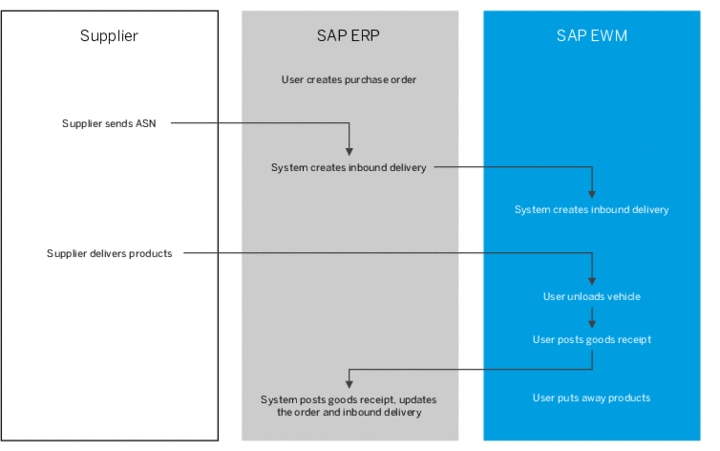
You order products from the supplier and create the corresponding purchase order in SAP ERP.
The supplier sends an ASN for the purchase order.
SAP ERP creates a corresponding inbound delivery and sends it to EWM.
EWM automatically creates an inbound delivery.
The supplier delivers the products. You unload the vehicle and transport the finished products into the warehouse, for example into the goods receipt area.
You post the goods receipt for the entire inbound delivery, and put away the products.
SAP EWM transmits the goods receipt posting to SAP ERP. SAP ERP also posts goods receipt for the related inbound delivery. SAP ERP also updates the stock in the purchase order and in the inbound delivery, due to the goods movement.
Goods Receipt Posting Without ASN but with Expected Goods Receipt Function
The following figure provides an overview of the process flow:
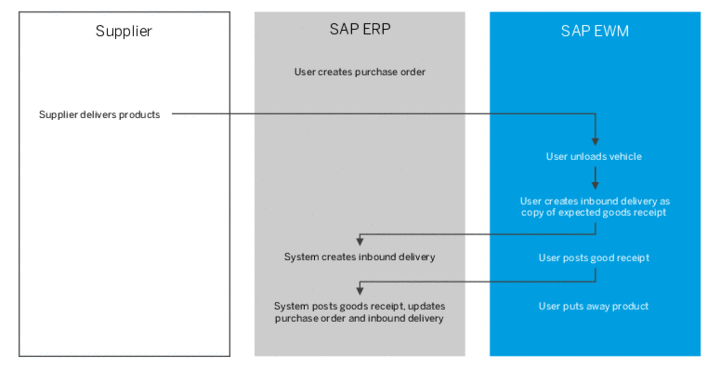
You order products from the supplier and create the corresponding purchase order in SAP ERP.
The supplier does not send an ASN for the open purchase order. Since SAP ERP has not yet generated an inbound delivery, you work with the expected goods receipt function in EWM.
The supplier delivers the products. You unload the vehicle and transport the finished products into the warehouse, for example into the goods receipt area.
You can use the number of the purchase order or product to find the expected goods receipt, and generate a corresponding inbound delivery in EWM. For this, you use the expected goods receipt (purchase order) as a template and, if necessary, you can adjust the quantities. For more information, see Generate Inbound Delivery from Expected Goods Receipt.
EWM transfers the inbound delivery to SAP ERP, which generates a corresponding inbound delivery.
If the item type allows the use of stock-specific units or measure (UoMs), you can also change the UoM.
You post the goods receipt and put away the products.
EWM transmits the goods receipt posting to SAP ERP. SAP ERP posts the goods receipt. SAP ERP also updates the open quantities in the purchase order and in the inbound delivery, due to the goods movement.